
License Manager
To use the Professional edition of PC Game Booster, you will have to either purchase a license code from the Smart PC Utilities store or use the free 30-day trial of PC Game Booster Pro by clicking the Start Free Trial button in the lower-right corner of PC Game Booster's user interface.
📝 How to Register Your License
If you already have a license code:
-
Click the Register button in the lower-right corner of the PC Game Booster interface.
-
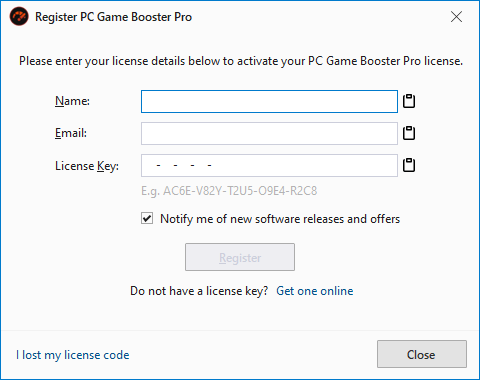
The Register PC Game Booster Pro dialog will appear.
-
Enter the following details:
-
Name – Your username
-
Email – Your email address
-
License Key – A 24-character code
-
Click Register to activate your license.
|
A working Internet connection is required to verify your license information and to cache the license on your computer.
|
|
You can use the Paste from Clipboard buttons to get license information from the clipboard to avoid typos.
|
If license registration is completed successfully, a message box will show up informing you that PC Game Booster Pro was successfully activated, and by clicking the OK button PC Game Booster will be restarted.
|
If you already purchased a PC Game Booster Pro license and did not receive or lost that license code, click the I lost my license code link, and we will help you restore it.
|
|
You can revoke your license, for example in case of requesting a refund by clicking the Revoke License button in the About PC Game Booster dialog box.
|
For more information about how to register your PC Game Booster Pro license and common licensing issues, please refer to our License Redemption Guide.