
System Optimizer
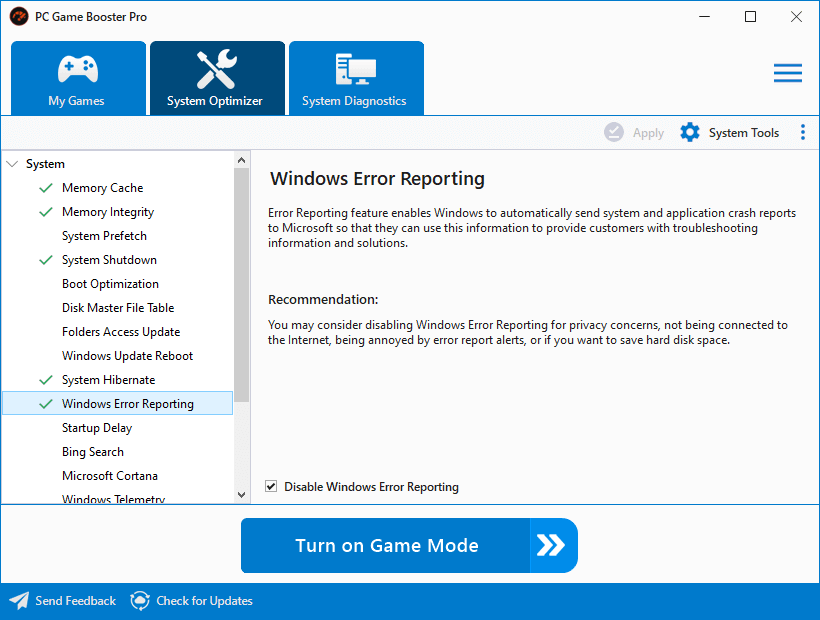
The System Optimizer feature in PC Game Booster provides a suite of tweaks designed to enhance system responsiveness, reduce background interruptions, and improve internet connectivity. These tweaks are especially useful for gamers seeking smoother gameplay and faster system behavior.
🧩 Categories of Tweaks
System Optimizer organizes tweaks into four intuitive categories:
-
System – Core OS behaviors like memory cache, boot optimization, and shutdown speed.
-
Internet – Network-related settings to reduce latency and improve connection stability.
-
Applications – Background services and app behaviors that may interfere with gaming.
-
Visual Effects – UI enhancements that can be disabled to free up system resources.
Each tweak includes:
- A description of the default Windows behavior.
- A recommendation explaining how PC Game Booster modifies it for better performance.
✅ Apply
✅ Apply
Click the Apply button to apply the selected tweaks. Before proceeding, PC Game Booster will prompt you to back up affected settings—this is highly recommended to ensure safe rollback if needed.
A system restart is required for changes to take full effect.
|
🛠️ System Tools
Access a collection of built-in Windows utilities to help monitor, manage, and optimize your gaming environment. These tools complement the tweaks and provide deeper control over system behavior.
🗂️ Restore Backup
Revert to default system settings using a Registry backup previously created by PC Game Booster. This is useful if a tweak causes unexpected behavior or if you want to undo all changes.
🛡️ Create System Restore Point
When enabled, PC Game Booster will automatically create a System Restore Point before applying any tweaks. This provides a safety net, allowing you to restore your system to its previous state in case something goes wrong.