
System Diagnostics
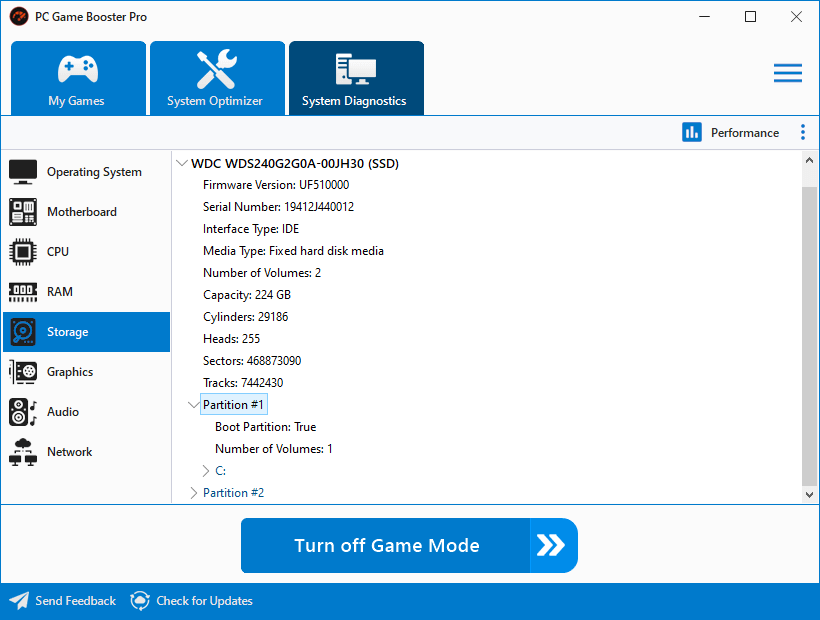
The System Diagnostics feature in PC Game Booster provides comprehensive information about your system’s hardware configuration and real-time performance metrics. It’s designed to help gamers and power users monitor, troubleshoot, and optimize their PCs with precision.
Performance
View live system health indicators including CPU usage, memory load, and disk activity. (see System Performance)
Export
Save the diagnostic data to a text file for documentation, sharing, or further analysis.
Refresh
Update the displayed information to reflect the latest system state.
Sections
Operating System
Details about OS version, running processes, services, and the file system.
Motherboard
Technical specs of the motherboard and BIOS firmware.
CPU
Processor model, core count, clock speed, and architecture.
RAM
Information about installed memory modules.
Storage
Details of hard drives and SSDs, including partitions and interface type.
Graphics
GPU specifications and connected display devices.
Audio
Installed sound devices and drivers.
Network
Network adapters, IP configurations, and connection status.